
You are using an out of date browser. It may not display this or other websites correctly.
You should upgrade or use an alternative browser.
You should upgrade or use an alternative browser.
Airbrushing flames
- Thread starter mark norval
- Start date
mark norval
Sealiner

mark norval
Sealiner

mark norval
Sealiner

mark norval
Sealiner

mark norval
Sealiner
mark norval
Sealiner

mark norval
Sealiner

mark norval
Sealiner
mark norval
Sealiner

mark norval
Sealiner
mark norval
Sealiner
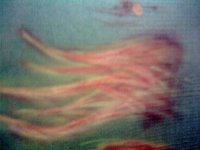
The final product should look like this. Remember this was rushed off and took me no more than 20min that is mixing paint and cleaning gun in between. Use your time and use fine painting lines for better effects. You can put down as many layers as you wish to get the desired look.
Attachments

mark norval
Sealiner
A nice tip. Use about two different shades of each color to give it more depth. Clean gun between color changes.
I'm no pro so I do not say that my ways are the best or that I can paint well I'm far from it!
I like this hobby but not more than I love fishing. Hope this helps a bit. Have a look on you tube for some ideas and some video tutorials. this is the basic step to flames.
Good luck and happy painting.
I'm no pro so I do not say that my ways are the best or that I can paint well I'm far from it!
I like this hobby but not more than I love fishing. Hope this helps a bit. Have a look on you tube for some ideas and some video tutorials. this is the basic step to flames.
Good luck and happy painting.